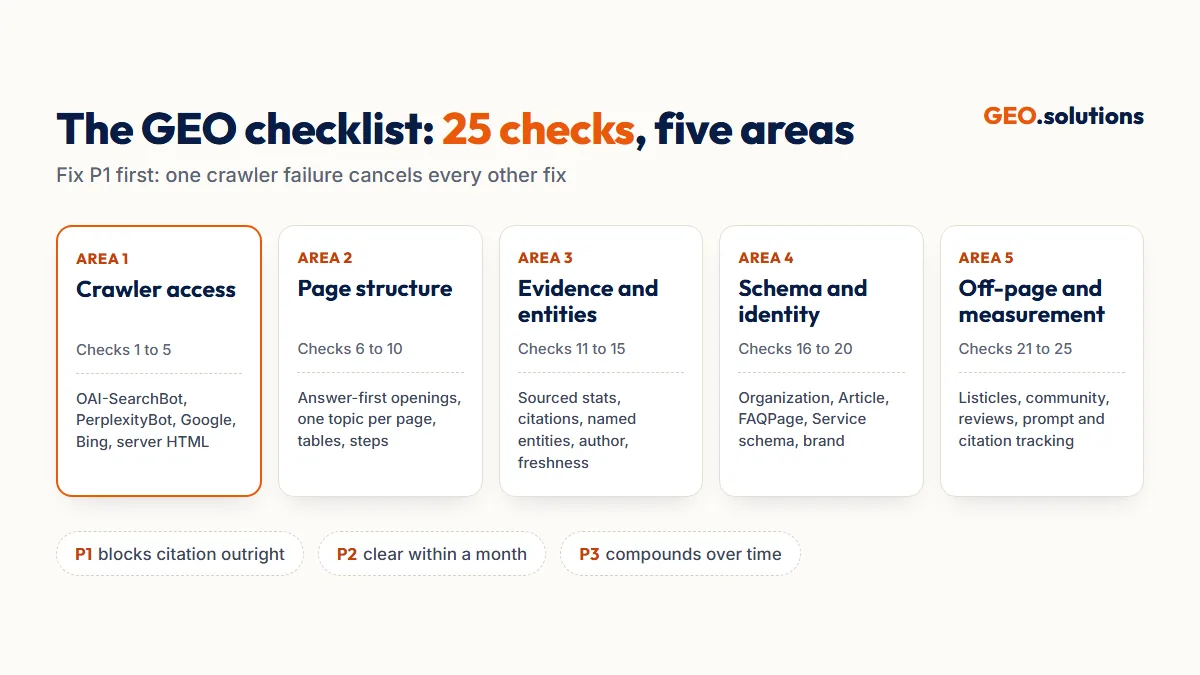
A GEO checklist is a list of pass/fail tests that shows whether AI engines can crawl, understand, trust and cite your pages. This checklist has 25 checks across five areas: crawler access, page structure, evidence, schema and off-page signals. Each check comes with a pass criterion, a priority and the tool that tests it. The template at the end lets you track every fix in one sheet.
Most GEO checklists tell you what to do. Few tell you how to know it’s done. Every check below has a “pass when” line, so a marketer, a developer or an agency client can each mark it complete without guessing.
What Is a GEO Checklist?
A GEO checklist is a fixed list of conditions a page or site must meet to be eligible for citation in ChatGPT, Perplexity, Gemini, Microsoft Copilot and Google AI Overviews. Each item is binary: the page either passes or fails.
Checklist vs Audit
A checklist lists the checks. An audit is the method you use to run them, which covers prompt testing, competitor comparison and the order of fixes. Use this checklist on its own for quick self-reviews. Use a full GEO audit when you need to know why competitors win citations you don’t.
How to Score It
Mark each check Pass or Fail. Fix the P1 checks first. These are the checks that block citation outright, so a P1 failure can zero out every other fix. Most sites can clear the P2 checks within a month. P3 checks compound over time.
Area 1: Crawler Access (Checks 1 to 5)
AI engines cannot cite a page their crawlers cannot reach. These five checks come first because one failure here cancels everything below.
Which OpenAI Bot Controls ChatGPT Search
OAI-SearchBot decides whether your pages appear in ChatGPT search answers. GPTBot only collects content for model training. The two are set independently, so you can allow OAI-SearchBot and block GPTBot. OpenAI states that robots.txt changes take about 24 hours to affect search.
Why Google and Bing Access Still Matter
Google AI Overviews are built from Google’s search index, so a page Googlebot can’t index can’t appear in them. Copilot grounds its answers in Bing’s index. Bing Webmaster Tools also hosts the AI Performance report, which measures how often Copilot cites your pages.
Area 2: Page Structure (Checks 6 to 10)
AI engines retrieve pages in chunks, so each chunk needs a complete answer. These checks make your answers easy to lift and quote.
Area 3: Evidence and Entities (Checks 11 to 15)
AI engines favor pages that state facts with sources. In the Princeton GEO study, adding statistics, quotations and source citations improved visibility by up to 40%. Keyword stuffing performed worse than making no change at all.
Why Evidence Helps Smaller Sites Most
The Princeton study found the largest gains for pages ranked fifth in search, not first. For those pages, citing sources raised visibility by 115.1%. Checks 11 and 12 are the fastest way for a smaller site to get into AI answers. Our GEO best practices guide covers the full writing rules behind them.
What Counts as a Named Entity
A named entity is a specific, identifiable thing. Examples include “ISO 27001”, “Shopify Plus”, “Austin, Texas” and “OAI-SearchBot”. “Industry-leading security” fails check 13. “SOC 2 Type II certified since 2024” passes.
Area 4: Schema and Entity Identity (Checks 16 to 20)
Schema tells AI engines who you are and what each page contains. Consistent identity across platforms tells them you are the same entity everywhere.
Area 5: Off-Page Signals and Measurement (Checks 21 to 25)
AI engines check what other sites say about you before they recommend you. The last five checks cover third-party proof and how you measure citations.
Turning Off-Page Gaps Into Placements
Checks 21 to 23 fail on most new sites, and they take the longest to fix. Listicle placements and community mentions are the core of GEO entity building, which secures them on third-party sites.
Choosing a Tracking Setup
A spreadsheet with a fixed prompt list passes check 24 at no cost. Paid platforms automate the prompt runs and show competitor share of voice. Our roundup of the best generative engine optimization tools compares them.
The GEO Checklist Template
The template is one sheet with a row per check and six columns: #, Check, Pass When, Tool, Priority and Status. Copy the tables above into it, or download the ready-made version below.
Download the GEO Checklist Template (Excel)
How to Use the Template
- Add one tab per priority page, starting with your top 5 commercial pages.
- Set Status to Pass or Fail for each check.
- Filter to Fail + P1 and fix those first.
- Re-test monthly and note the date in a Last Checked column.
Adapting the Checklist for SaaS
SaaS sites need three additions. First, apply checks 6 to 10 to help docs and feature pages, not just the marketing site. Second, build comparison pages for “[your product] vs [competitor]” prompts. Third, keep pricing in HTML text, because AI engines answer pricing questions and can’t read a pricing image.
Get Your Checklist Scored by a Specialist
GEO.solutions runs all 25 checks for you and adds what a self-check can’t. That means testing your buyer prompts across five AI engines and showing which competitors take the citations you are missing. The Starter GEO Audit costs $99 and delivers in 3 days, with a gap report and 5 quick-win fixes.
Frequently Asked Questions
What is a GEO checklist?
A GEO checklist is a list of pass/fail checks showing whether AI engines can crawl, understand, trust and cite your pages. This version has 25 checks across crawler access, page structure, evidence, schema and off-page signals.
What is the difference between a GEO checklist and a GEO audit?
A GEO checklist lists what to check. A GEO audit is the full process of running those checks, testing buyer prompts across AI engines and comparing your citations against competitors.
Which GEO checks matter most?
Crawler access checks matter most, because a blocked crawler cancels every other fix. Allow OAI-SearchBot, PerplexityBot, Googlebot and Bingbot first. Then make sure key content renders in HTML without JavaScript.
Should I block GPTBot to protect my content?
Blocking GPTBot stops OpenAI from using your content for model training. It does not remove you from ChatGPT search. OAI-SearchBot controls search visibility separately, so you can block one and allow the other.
How often should I run a GEO checklist?
Run the full checklist quarterly. Run checks 24 and 25 (prompt and citation tracking) monthly. Re-check crawler access after any robots.txt or CDN change.
Does schema markup guarantee AI citations?
No. Schema helps AI engines identify your brand and page type, but citations depend on answer quality, evidence and third-party mentions. Treat schema as one area out of five, not a shortcut.