A GEO audit measures how often AI engines mention and cite your brand when buyers ask questions about your category. You run one by testing a fixed set of buyer prompts across ChatGPT, Perplexity, Gemini, Microsoft Copilot and Google AI Overviews. You record every answer in one sheet and score the results against your competitors. This guide covers the method in 9 steps, including how many prompts to use, how to control for answer variance and exactly which fields to record.
Most GEO audit guides tell you to “test prompts” and stop there. They skip the details that make results repeatable: how many runs per prompt, which account state to test from and how to turn raw answers into scores. Those details are below.
What a GEO Audit Measures
A GEO audit measures three things: whether AI engines mention your brand, whether they cite your website as a source, and how often you appear compared with competitors. These map to three scores: mention rate, citation rate and share of voice.
GEO Audit vs GEO Checklist
A GEO audit is a method you run. A GEO checklist is a list of conditions your pages must meet. The audit tells you where you are invisible. The checklist tells you which page-level fixes to make. Step 7 below connects the two.
How Long a DIY Audit Takes
A 30-prompt audit across 5 engines, at 3 runs each, produces 450 answers. Plan on one to two working days to run the prompts, record the answers and score them by hand.
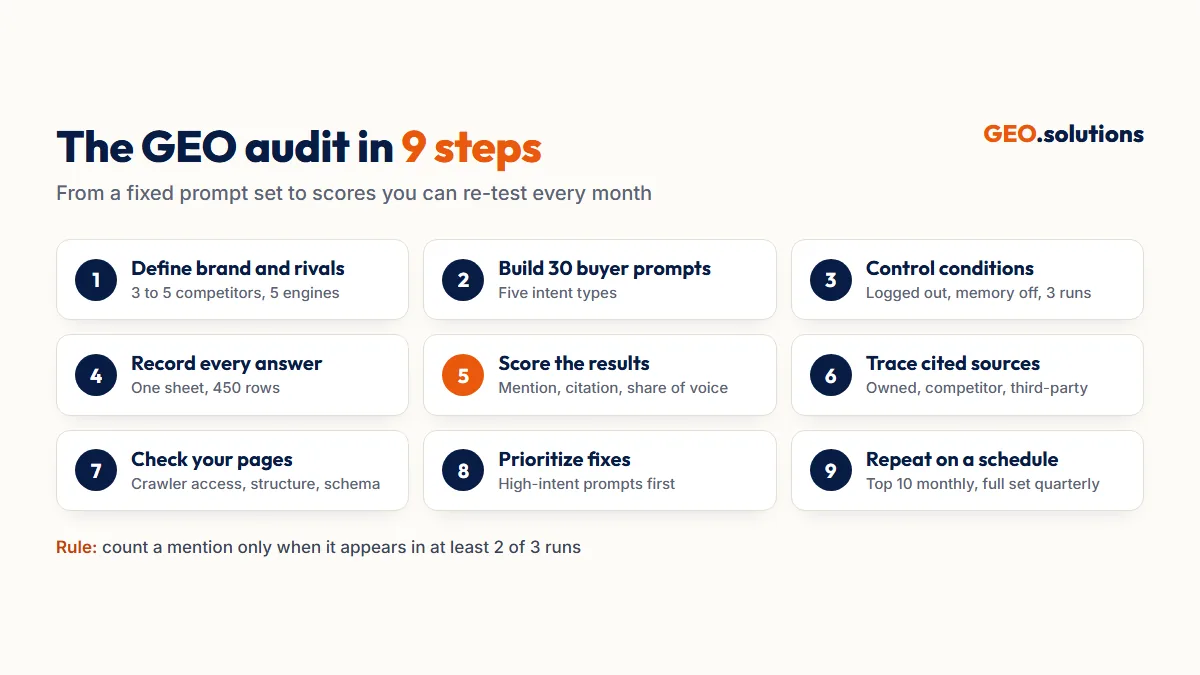
Step 1: Define Your Brand, Competitors and Engines
Start by fixing the three inputs that every later step depends on. Changing any of them mid-audit makes your results impossible to compare.
Pick 3 to 5 Competitors
Choose the competitors buyers actually compare you with, not the biggest names in your industry. Use the brands that appear when you search “[your category] alternatives” and the ones your sales team hears about on calls.
Pick 5 Engines
Test ChatGPT, Perplexity, Gemini, Microsoft Copilot and Google AI Overviews. Each draws on different sources. Copilot grounds its answers in Bing’s index. AI Overviews draw from Google’s index. ChatGPT search depends on access by OpenAI’s OAI-SearchBot crawler. A brand cited in one engine can be absent from the other four.
Step 2: Build a Set of 30 Buyer Prompts
Write 30 prompts that match how buyers phrase questions to AI engines, spread across five intent types. Thirty prompts is enough to show patterns without making the audit unmanageable by hand.
Phrase Prompts Like Buyers, Not Keywords
AI prompts are full questions with context. “Best CRM” is a keyword. “What’s the best CRM for a 10-person real estate team under $50 a month?” is a prompt. Pull real phrasing from sales calls, support tickets and the People Also Ask boxes for your category.
Cover Subtopics, Not Just the Main Question
Google’s own documentation says AI Overviews and AI Mode use “query fan-out.” That means they run several related searches across subtopics to build one answer. Add 2 to 3 subtopic prompts for each of your most important questions. A page that never ranks for the main query can still be cited for a subtopic.
Step 3: Control the Test Conditions
Run every prompt under the same conditions, or variance will drown out your real results. AI answers change with account history, memory, location and session context.
Test Logged Out, With Memory Off
Use logged-out sessions or private windows wherever the engine allows. Where an account is required, turn off memory and personalization, and start a new chat for every prompt. Set one location, either with a VPN or by stating the location in the prompt, and keep it the same throughout.
Run Each Prompt 3 Times
AI engines don’t return the same answer twice. Run each prompt 3 times per engine and count a mention only when it appears in at least 2 of the 3 runs. This filters out one-off answers and gives you a stable baseline to re-test against.
Step 4: Record Every Answer in One Sheet
Log every run in a single sheet with one row per prompt, engine and run. Thirty prompts across 5 engines at 3 runs each gives you 450 rows.
Save the Exact Wording
Paste the sentence that describes your brand into the Framing column. Wording like “a budget option” or “best for enterprises” shows how AI engines position you. That positioning often differs from how you position yourself.
Capture All Cited URLs, Not Just Yours
Record every source link in the answer, including competitor and third-party sites. Step 6 uses these links to find the pages AI engines trust in your category.
Step 5: Score Mention Rate, Citation Rate and Share of Voice
Turn your 450 rows into three scores for each engine and one combined score per competitor. Use the “2 of 3 runs” rule from Step 3 to decide whether each prompt counts as a mention.
Read the Gap Between Mention and Citation
A high mention rate with a low citation rate means AI engines know your brand but cite other sites as the source. Listicles, review platforms and forums are telling the story for you. A low mention rate means the engines don’t treat you as part of the category yet.
Score Each Engine Separately
Keep a separate set of scores for each engine. A brand with 60% mention rate in Perplexity and 10% in Copilot has a Bing index problem, not a content problem. A single blended score hides that difference.
Step 6: Trace the Sources AI Engines Cite
Group every cited URL from Step 4 into three source types to find out where AI engines get their information about your category.
Classify Owned, Competitor and Third-Party Sources
- Owned: your own pages. These show which of your content already works.
- Competitor: competitor pages. These show the formats AI engines trust, such as comparison pages and pricing tables.
- Third-party: listicles, review sites, Reddit threads and directories. These show the off-page placements you’re missing.
Find the Pages Cited Most Often
Sort the All Cited URLs column by frequency. The 10 most-cited third-party URLs are your priority targets for placements and mentions. The most-cited competitor pages are the formats to match or beat.
Step 7: Check Your Pages Against the GEO Checklist
Run the pages that should have been cited through a page-level checklist to find out why they weren’t. The audit tells you where you’re invisible. The checklist tells you what to fix on the page.
Check Crawler Access First
Confirm that robots.txt allows OAI-SearchBot, PerplexityBot, Googlebot and Bingbot, and that your key content renders without JavaScript. OpenAI states that sites blocking OAI-SearchBot will not be shown in ChatGPT search answers. A blocked crawler explains a zero citation rate on its own.
Then Check Structure, Evidence and Schema
Work through answer-first openings, sourced statistics, named entities and schema for each underperforming page. Our GEO checklist with 25 checks and a downloadable template gives a pass criterion for every check.
Step 8: Prioritize Fixes by Prompt Value
Rank every gap by the commercial value of the prompts it affects, then by how fast you can fix it.
Fix High-Intent Prompts First
Comparison and pricing prompts come from buyers close to a decision. A gap on “[competitor] vs [your brand]” costs more than a gap on a broad category question. Fix those pages first.
Split On-Page Fixes From Off-Page Work
On-page fixes, such as rewriting openings, adding tables or fixing schema, can show results within weeks of a recrawl. Off-page gaps take longer, because they need listicle placements and third-party mentions earned through GEO entity building. Run both at once rather than in sequence.
Step 9: Repeat the Audit on a Schedule
Re-run the same 30 prompts monthly for your top 10 prompts, and quarterly for the full set. Keep the prompts, engines, competitors and test conditions the same so the scores can be compared over time.
Add Data AI Engines Report Themselves
Bing Webmaster Tools’ AI Performance report shows how often Copilot cites your pages. It is the only first-party citation count available from a major engine. Google Search Console has no separate AI Overviews filter. Google states that AI Overviews and AI Mode traffic is counted within the standard “Web” search type. For trends, compare Web clicks against AI referral traffic segmented in GA4.
Know When to Switch to a Tool
Manual audits work well up to about 30 prompts. Beyond that, tracking platforms automate the runs and the share of voice charts. Our guide to the best generative engine optimization tools compares the options.
Conclusion
A GEO audit is only as reliable as its method. You need a fixed prompt set, the same five engines, logged-out sessions, three runs per prompt and one record sheet. With those in place, your mention rate, citation rate and share of voice show real movement rather than random variance.
Run the audit once to find your gaps. Run it again each month to prove the fixes worked.
Have Specialists Run Your GEO Audit
GEO.solutions runs this method for you and returns the scores, the cited-source map and a fix list. The GEO Audit has two tiers:
- Starter: 10 prompts across 3 engines, with a gap report and 5 quick wins. $99, delivered in 3 days.
- Pro: 30 prompts across all 5 engines, plus an entity and schema walkthrough. $290, delivered in 5 days.
Frequently Asked Questions
How do you check generative engine optimization?
You check generative engine optimization by testing a fixed set of buyer prompts across AI engines and recording whether each answer mentions or cites your brand. Score the results as mention rate, citation rate and share of voice against your competitors.
How many prompts should a GEO audit use?
Use 30 prompts for a manual GEO audit, spread across category, problem, comparison, pricing and brand questions. Run each prompt 3 times per engine, and count a mention only when it appears in at least 2 of the 3 runs.
Which AI engines should a GEO audit cover?
Cover ChatGPT, Perplexity, Gemini, Microsoft Copilot and Google AI Overviews. Each engine draws on different sources and indexes, so a brand cited in one can be missing from the others.
Why do AI answers change every time I run a prompt?
AI engines generate each answer fresh. Account history, memory, location and session context all change the output. Test logged out, with memory off, from one fixed location, and run each prompt 3 times.
Can I see AI Overviews traffic in Google Search Console?
Not separately. Google counts AI Overviews and AI Mode traffic within the standard “Web” search type in the Performance report. Bing Webmaster Tools offers a dedicated AI Performance report for Copilot citations.
How often should I run a GEO audit?
Run the full audit quarterly, and re-test your top 10 prompts monthly. Keep the prompts, engines and test conditions the same each time so the scores can be compared.