By the GEO.solutions team | Last updated: 4 November 2026
If you want to optimize website content for Gemini and Claude, it helps to understand how each platform accesses and uses web content. However, getting cited in Google Gemini requires a particularly careful approach: Google has not published a guide explaining how websites are selected as sources in the Gemini app.
Google’s Help pages explain when Gemini displays sources, while its crawler documentation describes how content from the Google Search index can be supplied to Gemini at prompt time. These documents explain part of the process, but they do not provide a formula for earning citations.
This guide separates what Google has actually documented from what remains unknown. It also provides a practical, low-risk process for checking whether your website appears in Gemini responses.
This article is part of our wider work on AI search optimization. Our GEO services cover visibility across multiple AI platforms. We offer this work commercially, so treat the recommendations here as one perspective and evaluate them against the original documentation linked throughout the article.
Key Takeaways
- Google documents how sources can appear in Gemini Apps, but it does not publish how those sources are selected.
- Google’s crawler documentation says content from the Google Search index can be supplied to Gemini for grounding.
- The Google-Extended robots.txt token controls whether crawled content can be used for Gemini model training and grounding. It does not affect Google Search inclusion or rankings.
- Not every Gemini response includes sources, so checking a single prompt once is not enough to establish a pattern.
- Clear content, accurate information and consistent brand details are sensible website practices, but Google has not confirmed them as Gemini citation-ranking factors.
In this guide: What Google has published | What is not published | Four practical steps | Claude | Common mistakes | FAQs
What Google Has Published About Gemini Sources
Google has published documentation that helps explain how sources and grounding work in Gemini. Four resources are particularly relevant. Together, they describe parts of the system, not a guaranteed method for getting cited.
Two important limitations apply when interpreting these sources.
First, the Grounding with Google Search documentation describes the Gemini developer API. It is not a complete explanation of how the consumer Gemini app selects sources. It helps illustrate a documented grounding mechanism, but it does not prove that every Gemini app response follows the same process.
Second, Google’s Gemini Help documentation warns that Gemini can hallucinate and present inaccurate information as factual. A response containing sources is not automatically accurate.
Three Different Products Often Called Gemini
Some confusion comes from using the word Gemini to describe several products and experiences. Their documentation and controls are not interchangeable.
A recommendation written for one of these products does not automatically apply to the others.
This article focuses on the Gemini app (Gemini Apps). The developer documentation is referenced only to explain the publicly documented grounding mechanism.
How a Grounded Gemini Answer Is Built
Google’s developer documentation provides a useful description of the grounding process.
The model first analyses the user’s prompt and decides whether a Google Search could improve its response. If it decides to search, it generates one or more search queries and retrieves results. It then synthesises those results into a response and can provide citations linking parts of the answer to source URLs.
The decision to search belongs to the model. This helps explain why some responses may contain sources while others do not.
However, Google does not publicly explain how the Gemini app ranks, filters or selects individual webpages for citations during the response-generation process.
What Google Has Not Published About Gemini Citations
This distinction matters because many articles and service providers describe Gemini citation tactics with more certainty than Google’s documentation supports.
In the official pages discussed above, Google does not publish:
- A definitive ranking formula for selecting websites to cite in Gemini.
- Confirmation that a particular Google Search ranking position determines whether a page is linked.
- A list of schema types that increase the likelihood of a Gemini citation.
- A preferred page length, content format or writing structure for Gemini citations.
- A complete explanation of how frequently Gemini searches or which queries it generates for a particular prompt.
- A confirmed relationship between every Search Console generative AI control and source selection in the Gemini app.
For example, Google’s Search generative AI control documents controls for AI Overviews, AI Mode and Discover. It should not be presented as a documented control for the Gemini app.
Similarly, Google’s guide to optimizing for generative AI features discusses features in Google Search, including AI Overviews and AI Mode. It does not provide a Gemini app citation formula.
The practical lesson is simple: do not turn Google’s Search documentation into claims about Gemini that Google has not made.
How to Evaluate Claims About Gemini SEO
Because Google has not published its source-selection rules, claims about specific Gemini citation factors should be treated as observations or hypotheses unless supported by stronger evidence.
Before following a recommendation, ask:
- What was measured? Was the claim based on actual Gemini citations, website rankings, a software score or an assumption?
- How many prompts were tested? A few examples do not establish a general pattern.
- When and where were the tests performed? Record the date, country, prompt wording and whether the user was signed in.
- Was there a comparison? A result observed on one website does not establish that a particular change caused the result.
- Does the publisher have a commercial interest? A vendor selling a Gemini SEO tool or service may have an incentive to present its own methodology as essential.
The same standard should apply to our recommendations. The steps in this guide are based on documented mechanisms and established website practices. They are not proven methods for increasing Gemini citations, and we do not claim to have controlled test data demonstrating a citation increase.
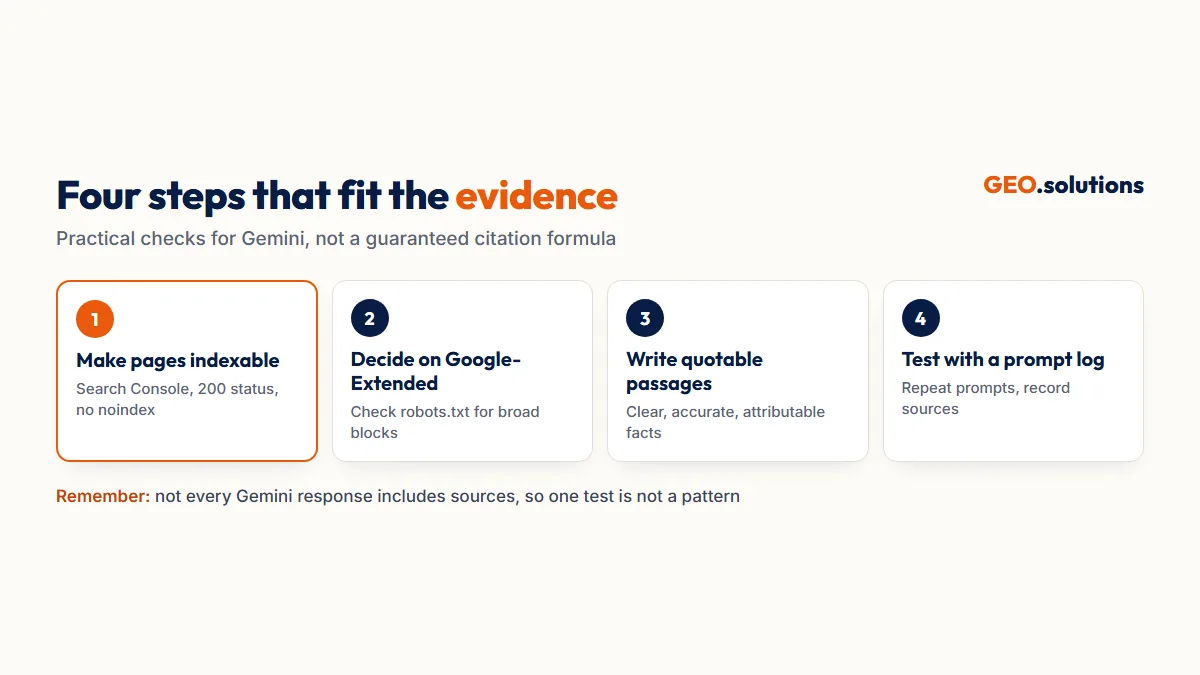
Four Steps That Fit the Available Evidence
The following steps are practical ways to check your website’s accessibility, content quality and visibility in Gemini. They are our recommendations, not instructions published by Google.
Step 1: Make Sure Google Can Index Your Important Pages
Google’s crawler documentation says that content from the Google Search index can be supplied to Gemini for grounding.
It follows that a page Google cannot index is unlikely to be available through that documented grounding route. However, Google does not publish this as a guaranteed rule for every Gemini response.
Start with the technical basics:
- Check important URLs in Google Search Console.
- Confirm that pages return a successful HTTP response.
- Make sure important pages are crawlable.
- Review robots.txt rules for accidental blocking.
- Check that pages intended to appear in Search are not marked
noindex. - Review restrictive snippet settings on pages where you want search engines to display content.
- Use internal links to help users and crawlers discover important pages.
These checks help establish a sound technical foundation. They do not guarantee that Gemini will select a page as a source.
For a broader explanation of retrieval and generative search, see our guide to how generative engine optimization works.
Step 2: Make an Informed Decision About Google-Extended
Google-Extended is particularly important because it has a documented role in how Google may use website content.
It is a robots.txt token that allows website owners to control whether crawled content can be used for Gemini model training and grounding in Gemini Apps and certain Vertex AI features.
If your goal is to make your content available for Gemini grounding, check that your robots.txt file does not accidentally disallow Google-Extended through a broad rule copied from an old template.
If you deliberately block it, understand the documented consequence: you are restricting Google’s use of that content for the specified Gemini training and grounding purposes.
There is an important distinction here:
- Google-Extended controls certain uses of crawled content for Gemini training and grounding.
- Search generative AI controls cover documented Google Search experiences, including AI Overviews, AI Mode and Discover.
They are separate controls with different purposes. Changing one should not be assumed to change the other.
Google also states that Google-Extended does not affect a site’s inclusion in Google Search or act as a Google Search ranking signal.
Step 3: Write Clear Passages That Can Be Quoted and Attributed
Google’s Gemini Help page says that direct quotes can include a link to the webpage in the sources list.
That makes clear, accurate and self-contained information a sensible content priority. A passage that communicates one specific point is easier for a reader to understand and verify than a paragraph filled with vague references.
In practice, consider the following:
- Answer the main question directly near the beginning of the relevant section.
- Explain technical terms when they first appear.
- Name the organisation, product or concept rather than relying on unclear references such as “it” or “this”.
- Support statistics with their original source and publication date.
- Separate confirmed facts from opinions, estimates and recommendations.
- Keep important business information consistent across your website.
- Update outdated information when the underlying facts change.
These are general content-quality practices, not confirmed Gemini citation requirements. Google has not stated that a particular passage structure or writing style increases the probability of a citation.
Our GEO best practices guide covers broader principles for creating useful, well-structured content.
Accuracy matters just as much as clarity. Google’s own documentation warns that Gemini can produce inaccurate responses. If your website contains unsupported or outdated claims, a citation may repeat incorrect information rather than help users understand your business.
Step 4: Test Gemini With a Repeatable Prompt Log
Google has not published a source-selection formula. Testing your own topics is therefore a practical way to understand what Gemini displays in your particular market.
Start with 10 to 20 prompts that reflect questions your customers might ask. Run them in the Gemini app and record the results.
Where possible, test both signed-in and signed-out experiences. Keep the testing conditions consistent so that you can compare observations over time.
Use three types of prompts:
Category questions: These explore whether your website appears when users ask general questions about your industry.
Example: “How do I choose a reliable [type of provider]?”
Comparison questions: These show how your brand is represented when users compare you with competitors.
Example: “Compare [your brand] with [competitor] for [service or product].”
Brand questions: These help identify whether Gemini presents accurate information about your organisation.
Example: “What does [your brand] offer, and who is it suitable for?”
Repeat each prompt on different days before drawing conclusions. One response is not enough to establish a reliable pattern.
Do not treat Gemini’s own explanation of its source-selection process as definitive evidence. Google’s Help documentation warns that Gemini can misrepresent how it works. Treat such explanations as responses to investigate, not as official documentation.
If you want to run checks at scale, our guide to generative engine optimization tools covers software that can support this work. Treat vendor scores as unverified until you compare them with your own observations.
What About Claude?
The keyword research for this topic also includes Claude, so it is useful to understand one important difference between Google’s and Anthropic’s published crawler documentation.
Anthropic’s Help Center documentation describes three crawlers with different purposes and robots.txt controls.
Anthropic also says that blocking crawlers by IP address is not a reliable way to opt out.
The distinction is worth understanding:
- Google documents Google-Extended as a control for certain Gemini training and grounding uses.
- Anthropic documents separate crawlers for training, user-directed fetching and search.
- Neither company publishes a complete formula explaining how its AI systems select individual webpages to cite.
The practical approach is to understand each platform’s official crawler documentation, avoid accidental blocking and test your website separately in each product.
For platform-specific guidance, see our articles on getting cited in ChatGPT and getting cited in Perplexity.
If Gemini Gets a Fact About Your Business Wrong
An inaccurate Gemini response can affect how people understand your organisation, products or services.
Google’s Help documentation suggests using the thumbs-down feedback option to flag an error. This is a feedback route, not a guarantee that the response will be corrected.
You can also review the information available on your own website and other public profiles:
- Identify the specific incorrect statement.
- Publish the correct information clearly on the most relevant page of your website.
- Check that the same information is consistent across your public business profiles.
- Re-run the original prompt after some time.
- Record whether the response changes.
This process helps you maintain accurate public information and observe whether Gemini’s response changes. It does not guarantee a correction or citation.
Common Mistakes When Trying to Get Cited in Gemini
Some common approaches create confusion because they treat assumptions as confirmed platform rules.
1. Treating Google’s AI Overviews guide as a Gemini guide
Google’s generative AI optimisation guide discusses features in Google Search, including AI Overviews and AI Mode. It does not provide a guide to citations in the Gemini app.
2. Blocking Google-Extended and expecting Search rankings to change
Google explicitly says that Google-Extended does not affect a website’s inclusion in Google Search or act as a Search ranking signal.
3. Assuming Google-Extended controls AI Overviews
Google documents Google-Extended for Gemini training and grounding. Search generative AI controls have a different documented scope.
4. Trusting a tool that claims to know Gemini’s citation formula
Google has not published a definitive source-selection formula. A third-party score should not be treated as an official Google metric.
5. Drawing conclusions from one prompt
Gemini responses can differ, and some do not include sources. Repeat tests and record the conditions before deciding that a pattern exists.
6. Ignoring the accuracy of cited information
A citation is not automatically a positive outcome. If the response contains an incorrect description of your business, the underlying information still needs attention.
Where GEO.solutions Can Help
If you want to understand how your website currently appears across AI-powered search experiences, a structured review can help identify technical and content issues worth investigating.
Our GEO audit examines visibility gaps, including situations where competitors appear as sources and your website does not.
If the main issues relate to existing website pages, our GEO content optimisation service focuses on improving the content you already have.
Neither service can guarantee a Gemini citation. Google’s source-selection process is not publicly documented, and no external provider controls which sources Gemini chooses to display.
Frequently Asked Questions
How do I get cited in Gemini?
Google has not published a formula for earning citations in Gemini. Its documentation says Gemini can use content from the Google Search index for grounding and displays sources when available. Check that your pages are accessible, review Google-Extended, publish accurate and clear information, and test relevant prompts repeatedly.
Does Gemini provide sources with every answer?
No. Google’s Help documentation says that some Gemini responses do not include related links or sources. When sources are available, users may see a Sources button or links displayed within the response. Sources can include public websites, uploaded files and Google Workspace content.
Does blocking Google-Extended remove my website from Google Search?
No. Google explicitly states that Google-Extended does not affect a website’s inclusion in Google Search and is not used as a Search ranking signal. It controls certain uses of crawled content for Gemini training and grounding. Blocking it restricts those specified uses, not ordinary Search inclusion.
Is Gemini SEO the same as Google SEO?
They overlap, but they are not identical. Google’s documentation says content from the Search index can be used for Gemini grounding, making indexing and crawlability relevant considerations. However, Google has not published Gemini-specific citation-ranking rules, so claims about a separate, proven Gemini SEO method should be treated cautiously.
Do Google AI Overviews optimisation tips apply to Gemini?
Not according to the scope of Google’s documentation. Its generative AI optimisation guide covers Google Search features such as AI Overviews and AI Mode, not the Gemini app. Some general practices, including accessible pages and useful content, are relevant considerations, but they should not be presented as confirmed Gemini citation requirements.
How is Claude different from Gemini?
Anthropic documents three crawlers: ClaudeBot, Claude-User and Claude-SearchBot. Google documents Google-Extended and how sources can appear in Gemini Apps. Both companies explain aspects of content access, but neither publishes a complete formula for selecting citation sources. Test each platform separately.
What should I do if Gemini gives incorrect information about my business?
Google’s Help documentation suggests using the thumbs-down button to report an error. You should also publish the correct information clearly on your own website and keep public business profiles consistent. Re-run the same prompt later and record whether the response changes. Feedback does not guarantee a correction.