You can monitor your brand’s AI visibility for free in about two to three hours a month. Run 15 fixed buyer prompts across five AI engines, log every answer in a spreadsheet and add the free first-party data from Bing, Google Search Console and GA4. Paid tools automate this, but for most small and mid-sized brands, a spreadsheet covers the same core metrics.
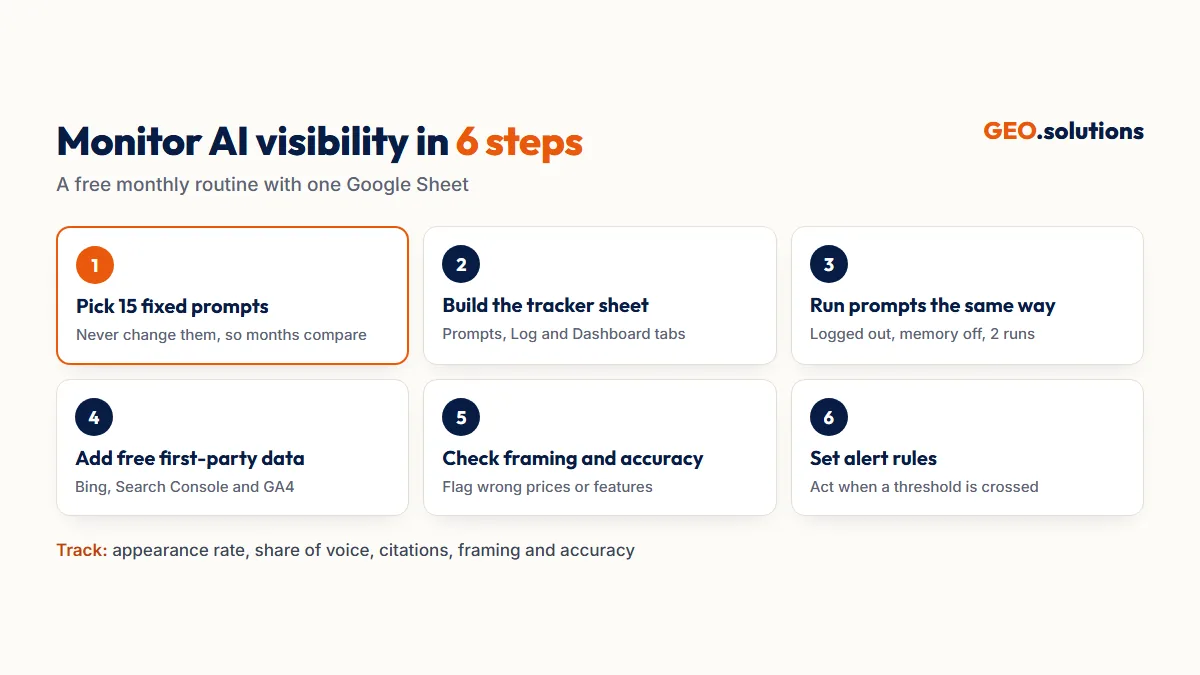
This guide sets up a monthly monitoring routine in 6 steps. It includes the tracker layout, the formulas for appearance rate and share of voice, and the alert rules that tell you when to act. A full one-time diagnosis is a different job, covered in How to Run a GEO Audit. This routine tracks the trend afterward.
What AI Visibility Monitoring Tracks
AI visibility monitoring tracks whether AI engines mention your brand, cite your site and describe you accurately, month after month.
The Four Things to Watch
- Appearance: whether your brand shows up in answers to buyer prompts.
- Share of voice: your mentions against competitors’ mentions.
- Citations: whether answers link to your pages.
- Framing and accuracy: how AI engines describe you, and whether the facts are right.
Why Monthly, Not Daily
AI answers change on almost every run. In a 2026 SparkToro and Gumshoe study, the same brand list repeated less than 1% of the time. Daily checks mostly capture that noise. A monthly routine with fixed prompts and repeat runs shows the real trend.
Step 1: Pick 15 Prompts You Will Never Change
Choose 15 buyer prompts and keep them identical every month, so each month’s results can be compared with the last. Changing prompts resets your trend line.
How to Split the 15 Prompts
Choose Prompts That Earn Revenue
Weight the set toward comparison and pricing prompts, because those come from buyers close to a decision. Write prompts the way buyers phrase them in full sentences, not as keywords.
Step 2: Build the Tracker Sheet
Set up one Google Sheet with three tabs: Prompts, Log and Dashboard.
The Log Tab Columns
The Dashboard Formulas
Put months down column A, starting in A2, and engine names across row 1, starting in B1. Then use:
Appearance rate (per month and engine):
=COUNTIFS(Log!$A:$A,$A2,Log!$C:$C,B$1,Log!$E:$E,1)/COUNTIFS(Log!$A:$A,$A2,Log!$C:$C,B$1)Citation rate (per month and engine):
=COUNTIFS(Log!$A:$A,$A2,Log!$C:$C,B$1,Log!$F:$F,1)/COUNTIFS(Log!$A:$A,$A2,Log!$C:$C,B$1)Share of voice (per month, all engines):
=SUMIFS(Log!$E:$E,Log!$A:$A,$A2)/SUMIFS(Log!$G:$G,Log!$A:$A,$A2)Format all three as percentages and add a line chart for each. These are run-level rates, meaning each run counts once, which is simpler than an audit’s “2 of 3 runs” rule and fine for spotting trends.
Step 3: Run the Prompts Under the Same Conditions
Run every prompt twice per engine each month, from logged-out sessions with memory off and the same location. That’s 150 checks a month: 15 prompts × 5 engines × 2 runs.
Keep Conditions Identical
Use private windows where an engine allows it. Where an account is required, turn off memory and start a new chat for each prompt. Run the checks in the same week each month. Fewer runs mean more noise, so treat a one-month swing with caution.
Record the Exact Wording
Paste the sentence that describes your brand into the Framing column. Over a few months, this column shows whether AI engines repeat your positioning or a competitor’s version of you.
Step 4: Add Free First-Party Data
Pull three free reports each month to cover what prompt testing can’t see.
Bing, Search Console and GA4
- Bing Webmaster Tools AI Performance report: Copilot citations and unique cited pages per day, page-level citations and the grounding queries behind them. Export the daily overview to a fourth tab.
- Google Search Console Generative AI performance reports: Rolled out from 3 June 2026 to a subset of sites. They show impressions and the pages appearing in AI Overviews and AI Mode, but no clicks.
- GA4 AI Assistant channel: Added in May 2026, it groups visits from recognized AI assistants. For full coverage, add a custom AI channel group, set up in How to Track AI Referral Traffic in GA4.
Know the Limits of Free Data
Bing covers Copilot only, and labels its data as sampled. Search Console’s AI reports haven’t reached every site yet and show no clicks. ChatGPT, Perplexity and Gemini offer no citation dashboards, which is why your prompt log matters.
Step 5: Check Framing and Accuracy
Read the Framing column each month and flag any answer that gets your prices, features or positioning wrong. AI engines don’t always describe brands accurately.
Why Accuracy Checks Matter
A study covered in a July 2026 critical survey of GEO research analyzed 98,020 claims in Google AI Overviews and classified about 11% as insufficiently supported. If an AI engine repeats an old price or a discontinued feature, buyers believe it.
How to Fix a Wrong Answer
Find the source behind the error. Check the cited URLs in the answer, or the grounding queries in Bing. If it’s your own outdated page, update the facts and request a recrawl. If it’s a third-party page, ask the publisher to correct it, and publish the correct information clearly on your own site.
Step 6: Set Alert Rules and Act on Them
Act when the numbers cross a set threshold, not every time they move. The thresholds below are our working rules of thumb. Adjust them once you have three months of data.
Alert Thresholds
Keep a Change Log
Add a Notes column to the Dashboard for every change you make: rewrites, new pages, placements and robots.txt edits. When a metric moves, the log shows what probably caused it. The KPIs behind these alerts are defined in How to Measure GEO Success.
When to Move to a Paid Tool
Upgrade to a paid AI visibility tool when manual monitoring stops fitting into a few hours a month.
Signs You’ve Outgrown the Spreadsheet
- You need more than about 30 prompts.
- You track several markets, languages or product lines.
- You need weekly or daily data for a launch or a crisis.
- You need automated competitor dashboards for stakeholders.
Keep the Method When You Switch
Bring your fixed prompts, alert thresholds and change log into the new tool. The method stays the same, and the tool only automates the runs. Compare the options in our roundup of the best generative engine optimization tools.
Conclusion
Free AI visibility monitoring takes 15 fixed prompts, five engines, two runs a month and one spreadsheet. Add Bing’s AI Performance report, Search Console’s Generative AI reports where available and GA4’s AI channels. Then watch four things: appearance, share of voice, citations and accuracy. Act only when a number crosses an alert threshold, and log every change so you can trace cause and effect.
Run it monthly, judge it quarterly and upgrade to a tool only when the spreadsheet can’t keep up.
Start With a Baseline
Monitoring works best from a known starting point. The GEO.solutions GEO Audit sets that baseline across 30 prompts and 5 engines. It shows where competitors are cited instead of you and gives you the first rows for your tracker. The Pro tier costs $290 and delivers in 5 days.
Frequently Asked Questions
How do I monitor my visibility in AI?
Run a fixed set of buyer prompts across ChatGPT, Perplexity, Gemini, Copilot and Google AI Overviews each month. Log whether your brand is mentioned and cited, and track appearance rate and share of voice in a spreadsheet. Add Bing’s AI Performance report and GA4’s AI channels for free first-party data.
Can I track AI brand mentions for free?
Yes. A spreadsheet with 15 fixed prompts, run twice a month on five engines, covers appearance rate, citation rate and share of voice. Bing Webmaster Tools, Google Search Console and GA4 add free first-party data.
How often should I check my AI visibility?
Monthly. AI answers vary on nearly every run, so daily checks mostly capture noise. Run the same prompts in the same week each month, and judge the trend over a quarter.
How many prompts do I need to monitor AI visibility?
Fifteen fixed prompts are enough for a monthly routine, spread across category, problem, comparison, pricing and brand questions. Use about 30 for a full audit.
What should I do if ChatGPT says something wrong about my brand?
Find the source behind the error in the answer’s cited links. Update your own page if it’s outdated, or ask the third-party publisher to correct theirs. Then re-test the prompt the following month.
When should I switch to a paid AI visibility tool?
Switch when you need more than about 30 prompts, several markets or languages, weekly data, or automated competitor dashboards for stakeholders.
Sources
- Search Engine Land: AI recommendation lists rarely repeat (SparkToro/Gumshoe)
- Search Influence: Inside Bing’s AI Performance Report
- PPC Land: Search Console generative AI visibility reports
- Delante: GA4 adds an AI Assistant channel
- A Critical Survey of Generative Engine Optimization (Martinez, July 2026)