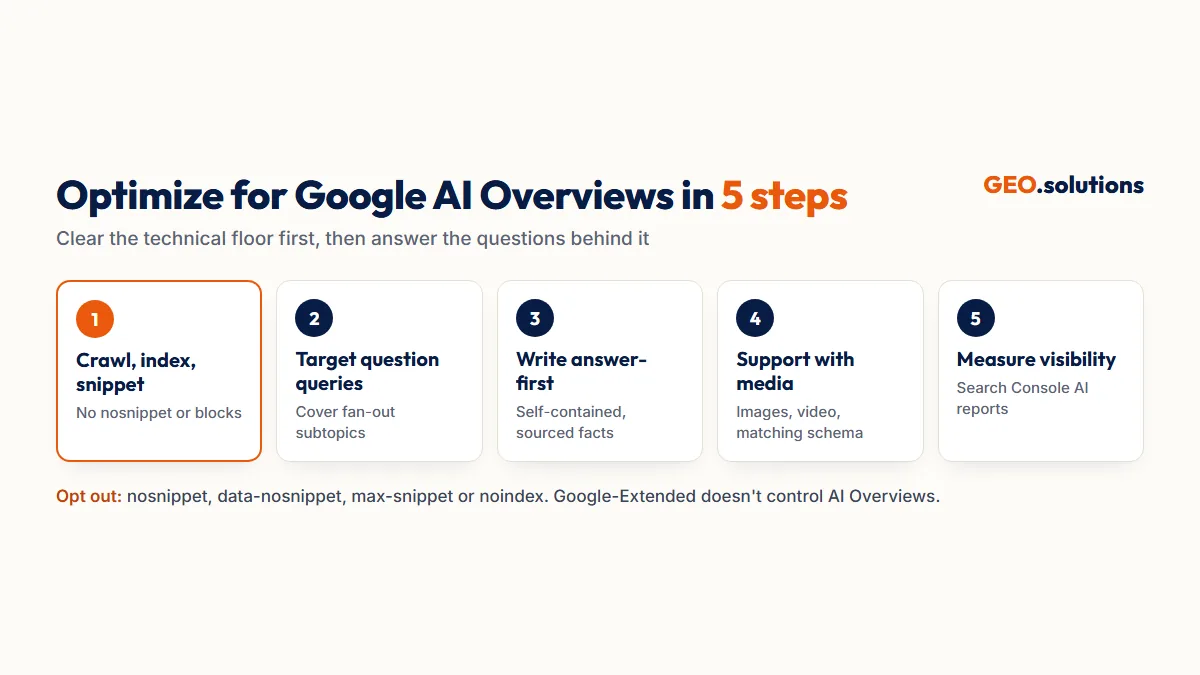
To optimize for Google AI Overviews, make sure Google can crawl and index your page and show it with a snippet. Then answer the question and its follow-up subtopics in clear, self-contained sections. Google’s documentation states there are no additional technical requirements to appear in AI Overviews beyond being indexed and eligible to show a snippet. What decides which eligible page gets cited is less documented. The data on that has shifted sharply in 2026.
This guide separates the two. First, what Google itself states about AI Overviews. Second, what independent studies add about which pages get cited, which queries trigger an AI Overview and how often anyone clicks. Five practical steps follow, along with how to measure results and how to opt out.
What Google Says About AI Overviews
Google states that pages need to be indexed and eligible to show a snippet to appear in AI Overviews, and that no special markup or files are needed. The quotes below come from Google’s “AI features and your website” documentation, last updated 10 December 2025.
Eligibility, in Google’s Words
Google says a page must be indexed and eligible to appear in Google Search with a snippet. It adds that meeting the requirements doesn’t guarantee Google will crawl, index or serve the page. Google also states that AI Overviews and AI Mode “may use different models and techniques, so the set of responses and links they show will vary.”
The Practices Google Says Still Apply
Google’s documentation lists these SEO best practices as still worthwhile for AI features:
- Allowing crawling in robots.txt and by any CDN or hosting infrastructure.
- Making content findable through internal links.
- Providing a good page experience.
- Keeping important content in text form.
- Supporting text with high-quality images and videos, where relevant.
- Making sure structured data matches the visible text on the page.
- Keeping Merchant Center and Business Profile information up to date.
Google presents these as general practices, not as AI Overview ranking factors. It also states that no AI text files, such as llms.txt, and no special schema are needed.
What the Data Adds to Google’s Documentation
Independent studies show that AI Overview citations increasingly come from outside the top 10, mostly appear on question-style queries, and change quickly. Google doesn’t publish any of these figures.
Most Citations Now Come From Outside the Top 10
Ahrefs’ March 2026 update, covering 863,000 keyword SERPs and 4 million AI Overview URLs, found that only 38% of cited URLs also ranked in the top 10. That’s down from about 76% in its July 2025 study. 36.7% of cited pages didn’t rank in the organic top 100 at all. Ahrefs suggests the cause is query fan-out: Google runs related sub-queries and cites pages that rank for those instead. Ahrefs presents this as a hypothesis, and its methodology changed between the two studies.
Question Queries Trigger AI Overviews Most
A study cited in a July 2026 critical survey of GEO research found AI Overviews appeared on 13.7% of queries overall, but on 64.7% of question-style queries. Pages that answer questions directly compete in far more AI Overviews than pages built around short keywords.
Citations Change Quickly
The same survey cites a study that found only 18% of pages stayed the same in AI Overviews across two months, against 45% for Google’s organic results. A citation won this month isn’t guaranteed next month, which is why ongoing measurement matters (Step 5).
Step 1: Confirm Google Can Crawl, Index and Snippet the Page
Check that Googlebot can reach the page, that it’s indexed and that nothing on it blocks a snippet. A page that fails this step can’t appear in an AI Overview at all.
Check Crawling and Indexing
Run the URL through Search Console’s URL Inspection tool. Confirm it’s indexed and that robots.txt, your CDN and any bot protection rules allow Googlebot. Content that only appears after JavaScript runs should also show in the rendered HTML.
Check for Snippet Blockers
Search the page source for nosnippet, max-snippet:0 and data-nosnippet on key sections. Google lists these as controls that limit what it shows from a page. If one was added by mistake, for example by a plugin, it can quietly keep the page out of AI Overviews.
Step 2: Target the Questions That Trigger AI Overviews
Build pages around the full questions buyers ask, and cover the related subtopics Google is likely to search for during fan-out.
Write for Question-Style Queries
Turn short keywords into the questions behind them. “AI overview SEO” becomes “How do I get my page cited in Google AI Overviews?” Use those questions as headings, because question-style queries trigger AI Overviews far more often than short keyword queries.
Cover the Fan-Out Subtopics
Google states that AI Overviews may run multiple related searches across subtopics to build a response. Query fan-out is why so many cited pages rank outside the top 10 for the main query. For each main question, add sections that answer 3 to 5 follow-ups, such as cost, comparisons, steps and exceptions. Each one gives Google another sub-query you can be cited for.
Step 3: Write Answer-First, Self-Contained Sections
Put the direct answer in the first one or two sentences under each heading, with specific facts that can be quoted without the rest of the page.
Lead With the Answer
Google states that important content should be available in text form. In practice, the sentence directly under a heading is the easiest one to lift into a summary. Replace openers like “There are many factors to consider” with the answer itself, naming the entity, the deciding attribute and a number. Before and after versions are in Generative Engine Optimization Examples.
Add Sourced Facts
In the Princeton-led GEO study, adding statistics, quotations and cited sources raised a page’s visibility in generated answers by up to 40% in controlled tests. Keyword stuffing performed worse than making no change. Attribute every number to a named source and year.
Step 4: Support Text With Images, Video and Structured Data
Add relevant images and video, keep structured data matched to the visible text, and keep your Merchant Center and Business Profile data current. Google’s documentation lists all three.
Use Images and Video
Google says high-quality images and videos support textual content in AI features. Video matters on its own too: in Ahrefs’ March 2026 data, YouTube URLs made up 5.6% of all AI Overview citations, and 18.2% of the cited pages that didn’t rank in the top 100. Where a topic suits video, a YouTube walkthrough gives you a second way to be cited.
Keep Structured Data Accurate
Structured data doesn’t need to be special for AI Overviews, but Google requires it to match what’s visible on the page. For products and local businesses, keep Merchant Center feeds and Business Profile details accurate, because Google names both in its guidance.
Step 5: Measure AI Overview Visibility
Track AI Overview impressions in Search Console where available, and judge results on visibility and click quality, not raw click volume.
Use Search Console’s Generative AI Reports
Google began rolling out Search Generative AI performance reports in Search Console on 3 June 2026, to a subset of sites. They show impressions and the pages appearing in AI features in Search, including AI Overviews and AI Mode, by country, device and date. They don’t show clicks. If your property doesn’t have them yet, AI Overview traffic is still counted in the standard Web search type. The full KPI set is in How to Measure GEO Success.
Expect Fewer, Better Clicks
Pew Research Center tracked 68,879 Google searches by 900 US adults in March 2025. Users who saw an AI summary clicked a traditional result on 8% of visits, against 15% without one. They clicked a link inside the summary on just 1% of visits. Google, for its part, states that clicks from results pages with AI Overviews are “higher quality,” meaning visitors spend more time on the site, though it publishes no data for this. Measure engagement and conversions on cited pages, not just sessions.
How to Limit or Opt Out of AI Overviews
Use Google’s snippet controls to limit what AI Overviews show from your page. Google-Extended doesn’t control Search’s AI features.
Snippet Controls
Google lists four controls for limiting what Search shows from your pages:
- nosnippet blocks all snippets.
- data-nosnippet blocks specific sections.
- max-snippet caps snippet length.
- noindex removes the page from Search entirely.
Each one also limits how the page can appear in regular search results, so use them only on content you’re willing to show less of everywhere.
What Google-Extended Does and Doesn’t Do
Google-Extended is a robots.txt token. Google describes it as limiting AI training and grounding in some of Google’s other systems. It isn’t presented as a control for AI Overviews in Search, so blocking it won’t remove you from AI Overviews. It also won’t hurt your eligibility for them.
Conclusion
Google documents the floor: indexed, crawlable, eligible for a snippet, with important content in text and structured data that matches the page. It doesn’t document what wins citations above that floor. 2026 data points in one direction. Citations increasingly come from pages that answer fan-out sub-questions rather than the top 10 for the main query. Question-style queries trigger most AI Overviews, and citations turn over fast.
Clear the technical floor, answer the main question and its follow-ups directly, back answers with sourced facts and measure impressions in Search Console. AI Mode uses different models and is covered in its own guide.
Find Out Where You Stand in AI Overviews
A GEO Audit from GEO.solutions tests your buyer prompts across 5 AI engines, including Google AI Overviews. It checks crawler access and snippet blockers, and returns a ranked fix list. The GEO Audit Pro tier covers 30 prompts for $290, delivered in 5 days.
Frequently Asked Questions
How do I get my website into Google AI Overviews?
Make sure the page is indexed and eligible to show a snippet, since Google states there are no additional technical requirements. Then answer the main question and its follow-up subtopics in clear, answer-first sections with sourced facts.
Do I need special schema or an llms.txt file for AI Overviews?
No. Google’s documentation states that no AI text files or special schema.org markup are needed to appear in AI Overviews or AI Mode. Any structured data you use should match the visible text.
Do I need to rank in the top 10 to appear in AI Overviews?
No longer as often. Ahrefs found in March 2026 that only 38% of AI Overview citations ranked in the top 10, down from about 76% in July 2025. Many cited pages rank for related sub-queries instead.
Do AI Overviews reduce clicks to websites?
Pew found users clicked a traditional result on 8% of visits with an AI summary, against 15% without one. Google states that the clicks that do happen are higher quality, meaning visitors spend more time on the site.
How can I see my AI Overviews performance?
Use Search Console’s Generative AI performance reports, which rolled out to a subset of sites from June 2026 and show AI feature impressions and pages. Otherwise, AI Overview traffic sits within the standard Web search type.
How do I stop my content appearing in AI Overviews?
Use nosnippet, data-nosnippet, max-snippet or noindex, as Google’s documentation lists. These also limit regular search snippets. Blocking Google-Extended doesn’t remove pages from AI Overviews.
Is optimizing for AI Overviews different from SEO?
The technical floor is the same as SEO: crawling, indexing and snippet eligibility. The difference is what wins citations, which increasingly means answering fan-out sub-questions with self-contained, sourced sections.
Sources
- Google Search Central: AI features and your website
- Ahrefs: Update: 38% of AI Overview Citations Pull From the Top 10
- PPC Land: AI search summaries reduce link clicks (Pew)
- A Critical Survey of Generative Engine Optimization (Martinez, July 2026)
- PPC Land: Search Console generative AI visibility reports
- GEO: Generative Engine Optimization (Aggarwal et al.)
- Google Search Central Blog: Top ways to ensure your content performs well in AI experiences (May 2025)