Steps checked against the GA4 and Search Console interfaces on 4 November 2026. Next recheck: by 4 December 2026.
To track AI referral traffic in GA4, check for the built-in AI Assistant channel, then create a custom channel group that matches AI sources with a regex. That second step catches ChatGPT, Perplexity, Gemini, Copilot and Claude. Google added the AI Assistant channel to GA4’s default channel group in May 2026, but the rollout is gradual and it doesn’t name every assistant. A custom channel group fills those gaps and applies to your historical data too.
This guide walks through 7 steps. It covers how to set up both channels, build a report that ties AI visits to conversions, track Google AI Mode traffic and recover AI visits that GA4 files as Direct.
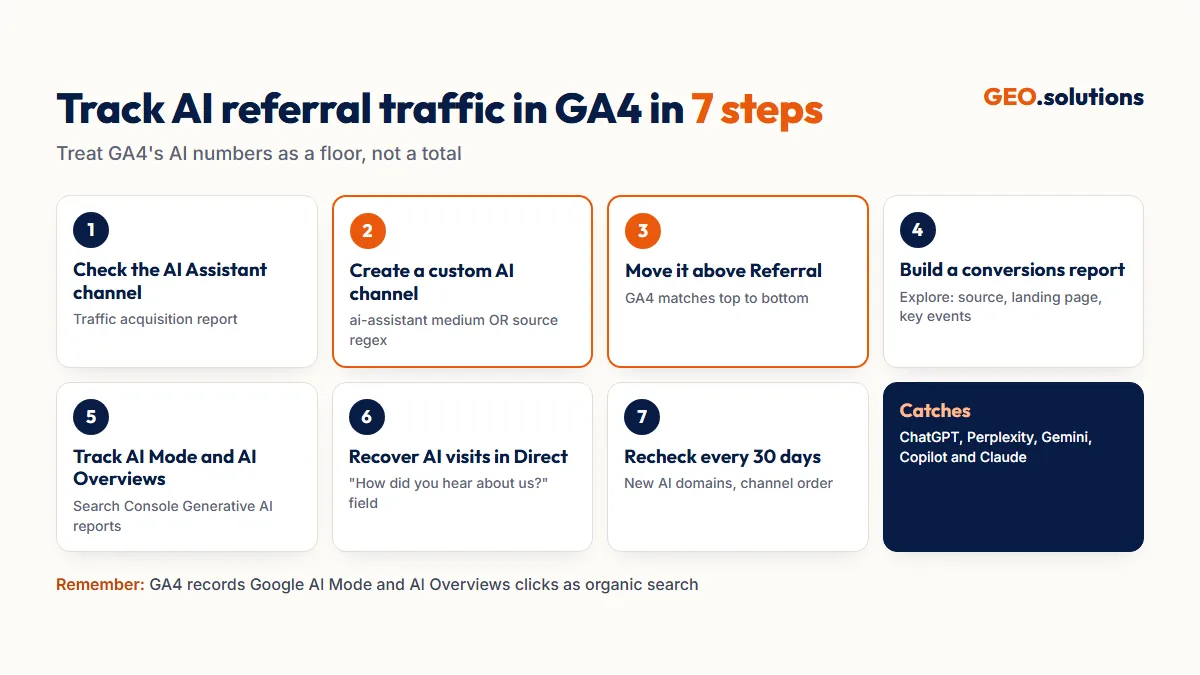
Step 1: Check for GA4’s Built-In AI Assistant Channel
Open Reports > Acquisition > Traffic acquisition and look for “AI Assistant” in the Session primary channel group column. If you see it, GA4 is already grouping some chatbot visits for you.
What the AI Assistant Channel Counts
When a visit’s referrer matches a recognized AI assistant, GA4 sets the Medium to ai-assistant and groups the session into the AI Assistant channel. Reports name ChatGPT, Gemini and Claude among the recognized sources. Google added the channel on 13 May 2026 and is rolling it out gradually, so some properties don’t show it yet.
What It Misses
- Assistants GA4 doesn’t recognize. Any AI source outside Google’s list stays in Referral.
- Visits without a referrer. Mobile apps, in-app browsers and copied links arrive with no referrer header, so they land in Direct.
- Google AI Overviews and AI Mode. These clicks stay in Organic Search (see Step 5).
- Older data. No backfill has been confirmed, so sessions before the rollout may still sit in Referral.
Step 2: Create a Custom AI Channel Group
Create a custom channel group with an AI channel that matches either the native ai-assistant medium or a regex list of AI sources. Custom channel groups apply to historical data, so your AI trend line reaches back past the native channel’s launch.
Copy the Default Group
- Go to Admin > Data display > Channel groups. You need the Editor role or higher.
- Open the default group’s More menu and choose Copy to create new. Name it “Default + AI.”
- Click Add new channel and name it “AI Referrals.”
Standard properties allow 2 custom channel groups and 50 channels per group.
Add the Conditions
Add two conditions joined by OR:
- Medium exactly matches
ai-assistant - Source matches regex:
^(www\.)?(chatgpt\.com|chat\.openai\.com|perplexity\.ai|gemini\.google\.com|copilot\.microsoft\.com|claude\.ai|deepseek\.com|grok\.com)$Check your Referral report for any AI source this list doesn’t cover, and add it to the regex. Channel definitions in GA4 are not case-sensitive.
Step 3: Move the AI Channel Above Referral
Click Reorder and drag “AI Referrals” above Referral, then click Apply and Save group. GA4 checks channels from top to bottom and places each session in the first channel it matches. If the AI channel sits below Referral, every AI visit is caught by Referral first.
Why the Order Matters
Google’s own guidance is to place more specific channels above broader ones. Referral is broad, because it matches almost any external site. AI Referrals is specific, so it has to come first.
Confirm It Worked
Open Reports > Acquisition > Traffic acquisition, click the dimension dropdown and switch to your “Default + AI” channel group. AI Referrals should now appear as its own row, including for dates before May 2026.
Step 4: Build an AI Traffic Report With Conversions
Build an exploration that shows which pages AI visitors land on and which of those visits convert. Session counts alone don’t justify a GEO budget. Conversions do.
Set Up the Exploration
- Go to Explore > Free form.
- Add the dimensions Session custom channel group (your Default + AI group), Session source and Landing page + query string.
- Add the metrics Sessions, Engaged sessions, Key events and Total revenue.
- Filter on the custom channel group, keeping only AI Referrals.
Read It by Source and Page
Break the results down by Session source to compare ChatGPT with Perplexity and Gemini. Then sort landing pages by key events. The pages that convert AI visitors are the ones worth protecting with regular refreshes. To turn the revenue into ROI, use the formula in GEO Budget and ROI.
Step 5: Track Google AI Mode and AI Overviews Traffic
GA4 can’t separate Google AI Mode or AI Overviews clicks from regular organic clicks. Use Search Console’s Generative AI performance reports instead. Both features send traffic that GA4 records as Google organic.
Use Search Console’s Generative AI Reports
Google began rolling out Search Generative AI performance reports in Search Console on 3 June 2026. They show impressions and the pages that appeared in AI features in Search, including AI Overviews and AI Mode, by country, device and date. They don’t show clicks, and only a subset of sites has them so far. If your property has them, they’re the cleanest first-party data on Google’s AI features.
Use Proxies When the Report Isn’t Available
- Pages in the AI report: Cross-reference the pages listed in Search Console’s AI report with their Google organic sessions in GA4.
- Branded search growth: A rise in branded queries in Search Console often follows wider AI visibility.
- Gemini is different: Visits from gemini.google.com do arrive as referrals, so your AI Referrals channel already catches them.
Step 6: Recover AI Visits Hidden in Direct
Add a self-reported attribution field to your forms to catch AI-influenced buyers that GA4 files as Direct. Analytics alone undercounts AI traffic.
Add an AI Option to Forms
Add “ChatGPT or another AI assistant” as an answer to “How did you hear about us?” on lead forms and checkout surveys. Count those answers alongside your AI Referrals conversions.
Watch Direct Landing Pages
Visits that land directly on deep pages, such as a specific guide or comparison page, rarely come from typed URLs. A sudden rise in Direct visits to the pages AI engines cite for you usually points to AI traffic arriving without a referrer.
Step 7: Recheck the Setup Every 30 Days
Review your AI channel and regex every month, because AI platforms change domains and Google keeps updating GA4.
What to Check Monthly
- New AI domains in the Referral report that your regex misses
- Whether the native AI Assistant channel has appeared in your property
- Whether the AI Referrals channel still sits above Referral
- Whether Search Console’s Generative AI reports have reached your property
Where This Fits in GEO Measurement
AI referral traffic is the business layer of GEO measurement. It sits alongside appearance rate, share of voice and citations. All six KPIs are defined in How to Measure GEO Success, and the tools that fill GA4’s gaps are compared in Best Generative Engine Optimization Tools.
Conclusion
Tracking AI referral traffic in GA4 takes three layers. First, check whether GA4’s built-in AI Assistant channel has reached your property. Second, add a custom channel group with an ai-assistant medium and regex condition, placed above Referral. Third, build an exploration that ties AI visits to key events and revenue. For Google AI Mode and AI Overviews, use Search Console’s Generative AI reports where available, because GA4 records those clicks as organic.
Add a self-reported attribution field, recheck the setup every 30 days and treat GA4’s AI numbers as a floor, not a total.
Find Out Which AI Engines Should Be Sending You Traffic
GA4 shows the visits you get. It doesn’t show the AI answers where competitors are cited instead of you. The GEO.solutions GEO Audit tests your buyer prompts across 5 AI engines and maps those gaps. The Pro tier costs $290 and delivers in 5 days.
Frequently Asked Questions
How do I see ChatGPT traffic in Google Analytics?
Check Reports > Acquisition > Traffic acquisition for the AI Assistant channel, which GA4 began rolling out in May 2026. For full coverage, create a custom channel group that matches chatgpt.com and other AI sources with a regex, placed above Referral.
How do I track Google AI Mode traffic?
GA4 can’t separate AI Mode clicks, because they’re recorded as Google organic. Use Search Console’s Generative AI performance reports, rolling out since June 2026, which show impressions and pages for AI Mode and AI Overviews.
What is the AI Assistant channel in GA4?
It’s a default channel GA4 added in May 2026. Visits from recognized AI assistants, such as ChatGPT, Gemini and Claude, get the medium ai-assistant and are grouped together. Visits with no referrer still land in Direct.
Why is some AI traffic showing as Direct in GA4?
Mobile apps, in-app browsers and copied links often send no referrer header, so GA4 can’t tell where the visit came from. Add a “How did you hear about us?” field to recover those buyers.
Does a custom channel group change my past GA4 data?
Custom channel groups can be applied to historical data in reports, so your AI channel shows sessions from before you created it. Your raw data isn’t changed.
What regex should I use for AI traffic in GA4?
Use a Source regex that lists AI domains, such as chatgpt.com, perplexity.ai, gemini.google.com, copilot.microsoft.com and claude.ai, with an optional www. Review your Referral report monthly for new AI domains to add.